
Ask ten people for affordable IPTV advice and nine will tell you to find the lowest monthly price. That advice collapses the moment a second viewer joins the household, a hockey game needs a regional feed, or a data cap resets on the 14th of the month.
Affordability in Canadian IPTV is not just a price. It is a ratio: what a household pays divided by what it watches. The plan term, the connections you use, the broadband underneath them, and the add-ons for live sports all sit in that numerator, and most price comparison pages leave them out.
Price the inputs candidly and the ranking of plans changes, often toward the provider with the higher sticker price.
Table of Contents
- What a Plan Really Costs Per Viewer
- How Many Connections Your Internet Can Carry
- Data Caps and Monthly Usage Math
- Sports Rights to Verify Before You Pay
- Terms and Add-On Fees That Change the Price
- How to Run a 24-Hour Trial Test
- Affordable IPTV Canada Questions Answered
- Choose a Plan You Have Tested
What a Plan Really Costs Per Viewer
IPTV is already a mainstream Canadian purchase, which makes advertised prices look more comparable than they are. The CRTC's communications monitoring report records IPTV penetration at 35% of Canadians in 2023, up from 20% in 2019, alongside 66% of Canadians still subscribing to traditional television and 78% taking a subscription video-on-demand service. The migration has kept moving: the CRTC's broadcasting data release shows households watching television exclusively through streaming platforms rising from 23% in 2023 to 29% in 2024, while time spent watching traditional television fell 8.6% during the year.
That combination, live channels for scheduled viewing plus on-demand for everything else, is what most Canadian households now want. It also explains why a single monthly figure summarizes cost poorly: two households can buy the same plan, use different numbers of screens, and finish with very different costs per viewer.
The formula, in order
Two divisions turn any plan into a comparable number. Divide the total price by the months in the term to get the monthly equivalent, then divide that by the connections your household will run at the same time.
Say a plan costs X CAD for 12 months with two connections. That is X ÷ 12 for the monthly equivalent, then ÷ 2 per viewer, or X ÷ 24 per viewer per month. Buy four connections for the same two-viewer household and the per-viewer figure rises by half without a single extra hour of viewing. Unused capacity is the quietest cost in this category.
Term length behaves the same way. A 12-month price only beats a 3-month price if you stay for the twelve. Cancel in month four and the effective monthly cost of the year plan can exceed the shorter term you would have bought instead.
The test that matters: divide the monthly equivalent by the screens running during peak hours. The result is the household's cost per viewer.
| Plan variable | Options offered | Effect on cost per viewer | What to check before buying |
|---|---|---|---|
| Subscription duration | 1, 3, 6 or 12 months | Divide the total price by the months to get the monthly equivalent | Whether the term renews automatically and what happens at the end |
| Simultaneous connections | 1 to 5 connections | Divide the monthly equivalent by the connections the household will use together | How many screens will run at the same time during peak hours |
| Content included | Live channels, sports, pay-per-view and on-demand | Cost per useful hour falls when the household watches both live and on-demand content included in the plan | Whether your sports channels and regional feeds are in the quoted price |
| Device support | Smart TVs, Firestick, Roku, Apple TV, phones and computers | A low price has no value if a required device cannot run the service | Install and test on each device during the trial |
ROVE IPTV sells plans by term and connection count, so the division can be run from the plan details on its website. A year-long example of the structure is 12 Months IPTV Subscription Canada – 2 Devices, which covers two simultaneous devices for twelve months.
Do the division before you shop. A plan advertised at a lower monthly rate can still produce a higher per-viewer figure once an idle second screen or an overlong term enters the arithmetic.
How Many Connections Your Internet Can Carry
A household's practical limit on simultaneous streams is the broadband underneath them, however many screens the house contains. The Canadian government identifies 50 Mbps download and 10 Mbps upload as the national high-speed benchmark and notes that 50 Mbps can support multiple simultaneous users and high-definition streaming. CRTC testing cited in the same national connectivity strategy found 57% of fixed-wireless tests below 50 Mbps during peak hours, which is exactly when IPTV households need that capacity most.
The planning model is straightforward. Reserve roughly 8 to 12 Mbps per HD stream and 20 to 30 Mbps per 4K stream, then add 20 to 30% headroom for protocol overhead, Wi-Fi variation and everything else the household is doing.
| Simultaneous streams | Basis of the figure |
|---|---|
| One HD stream | Calculated: 8 to 12 Mbps plus 20 to 30% headroom, about 10 to 16 Mbps |
| Two HD streams | About 19 to 31 Mbps |
| Four HD streams | About 38 to 62 Mbps |
| One 4K stream | Calculated: 20 to 30 Mbps plus 20 to 30% headroom, about 24 to 39 Mbps |
| Two 4K streams | About 48 to 78 Mbps |
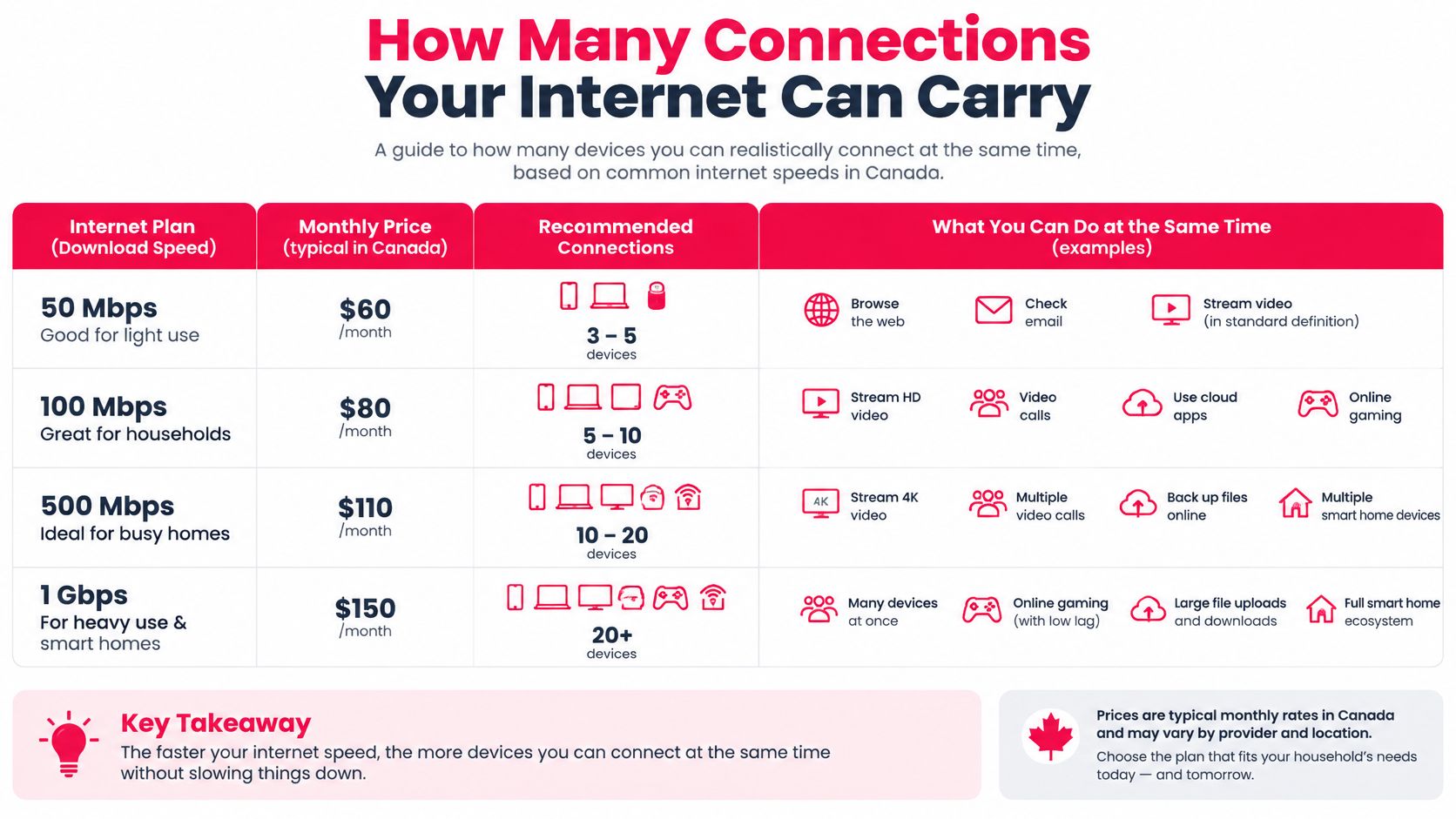
Treat the top of each range as the target rather than the middle. Advertised throughput is a best case, and the peak-hour testing above already shows real speeds sagging below the benchmark when the whole street is streaming.
Why the count is screens, not devices
A household with six connected devices might only ever run two at once. The number that matters is peak concurrency: how many separate programmes are playing at the same instant during the evening.
That distinction is where affordability meets bandwidth. A plan sold with four connections only lowers the cost per viewer if the line can carry four streams at once. Connections the broadband cannot serve are money spent on screens that stall.
Availability of fast service doesn't guarantee a good experience either. The CRTC's communications monitoring report found 97.3% of households had access to broadband meeting the 50/10 Mbps benchmark in 2025, yet only 56% of Canadians agreed their internet service was reliable, and rural and First Nations reserve communities sat below the national average despite nearly 90% gigabit availability.
In most home troubleshooting, the in-house Wi-Fi link is the first thing to check, and the fix usually costs nothing: switch to 5 GHz, or run Ethernet to the television.
If evening throughput sits below the target for your planned screens, work through the steps to troubleshoot slow connections before calling ISP, starting with router placement and band selection. Adaptive picture quality can reduce stalls when bandwidth dips, but it can't compensate for a congested access network or a weak signal inside the house. Households planning several screens should read how multiple devices share one subscription before choosing a connection count.
Data Caps and Monthly Usage Math
Data is the cost variable Canadian IPTV buyers skip, and it's the one that produces surprise bills. Monthly use depends on resolution, bitrate and which service is playing, which the CRTC's communications monitoring report measured hour by hour.
| Service or video type | Average GB per hour | Approximate GB per month at 3 hours a day |
|---|---|---|
| CBC TV | 0.89 | About 80 |
| Global TV | 1.22 | About 110 |
| CraveTV | 2.20 | About 200 |
| Netflix | 2.86 | About 260 |
| YouTube | 4.82 | About 430 |
| 4K video (approximate) | About 5 | About 450 |
The monthly column is the hourly figure multiplied by 90, which is three hours on each of 30 days. The spread is the story: one household can sit at 80 GB a month while another reaches about 450 GB on the same schedule, purely because of resolution and service.

Why two viewers double the bill
Two people watching separate HD streams roughly doubles the household total. A plan that works comfortably for one viewer can push a family with a 500 GB allowance into overage by the second week.
Adaptive streaming pulls consumption down during congestion by selecting a lower representation, which is why a capped connection sometimes looks softer on a busy evening. That's a feature, not a fault, but it can't rescue a household that's structurally over its allowance.
Compare the subscription cost against the ISP allowance and the overage rate, not against the subscription alone. Then check the meter once during the trial evening, using the ISP app or the router's own usage screen, before committing to a long term.
Sports Rights to Verify Before You Pay
A channel name in a lineup proves nothing about whether the game you want is available where you live. Canadian sports access is split across several rights holders, and the CRTC's decision record on sports distribution sets out who holds what: TVA Sports and RDS both broadcast National Hockey League games and share regional rights for Montréal Canadiens games, while Sportsnet identifies itself as the NHL's official Canadian national multimedia rights holder and the regional rights holder for teams including the Calgary Flames, Edmonton Oilers, Toronto Maple Leafs and Vancouver Canucks.
| Sport or team | Canadian rights holder | What to verify in the lineup |
|---|---|---|
| NHL national coverage | Sportsnet, the NHL's official Canadian national multimedia rights holder | The national Sportsnet feed is listed by name |
| Montréal Canadiens | TVA Sports and RDS, which share regional rights | Both feed names appear for Quebec viewers |
| Calgary Flames, Edmonton Oilers, Toronto Maple Leafs, Vancouver Canucks | Sportsnet, as regional rights holder | The regional Sportsnet feed for your city is included |
| Baseball, basketball, football, soccer | Specialty sports services such as RDS and Sportsnet | The specific channel for your market is named, not only the sport |
Regional fragmentation is the practical trap. The CRTC's regulatory record describes RDS, Rogers Sportsnet and other specialty services as sports broadcasters covering hockey, baseball, basketball, football and soccer, and confirms that Canadiens regional coverage is shared between TVA Sports and RDS. A lineup that suits a Toronto household may not deliver Canadiens, Senators, Jets or western coverage to a viewer in Manitoba or Alberta.
Canadian specialty channels also aren't interchangeable with international sports feeds. In Broadcasting Decision CRTC 2005-483, the regulator described TSN's primary role as sports coverage and limited sports-related drama to no more than 5% of the broadcast week, a condition that has no equivalent on a generic international feed.
The three checks before you pay
- Name the exact feed. Ask for the channel name and the regional version, not the sport. "Sportsnet Ontario" is a different product from "Sportsnet".
- Match it to your province or city. Confirm the feed carries your team's regional games, then check whether availability changes by region at all.
- Ask what happens when the primary stream drops. A backup is only useful if the provider explains which channels it covers and for how long it stays live.
Run one final test: list the three games or channels that matter most in your household and confirm each appears by name before you pay. For a broader view of Canadian sports scheduling, see where to watch live sports.
Terms and Add-On Fees That Change the Price
Fee stacking is normal in Canadian sports distribution, and it's the reason a base subscription price tells you so little. CBC Sports reported that some TV providers criticized a Rogers arrangement requiring a $12.99 monthly add-on for certain Monday-night hockey games unless customers already subscribed to Sportsnet on Rogers TV or Sportsnet Plus, in the first season of a 12-year, $11-billion national English-language rights agreement.
That mechanic matters for anyone comparing IPTV subscriptions. The relevant figure is the total cost of watching the games you're after, which is rarely the number in the headline.
The economics behind it explain why very cheap sports access deserves scrutiny rather than applause. The CRTC's broadcasting report records sports programming expenditures growing at an average annual rate of 7.8% from 2021 onward, with the cost of buying programming rights up about 11% annually for mainstream sports and national-news discretionary services. The same report estimated Canadians made 2.6 billion visits to piracy sites, with 26% of surveyed content consumers having accessed illegal online content during the referenced three-month period. Very low pricing against very expensive rights is a continuity question, not a bargain.
The checklist to run before paying
- Taxes and channels: confirm whether the quoted CAD price includes applicable taxes and every sports channel you need, or whether these are billed separately.
- Event surcharges: ask whether pay-per-view events or premium channels carry an extra charge on top of the plan.
- Refund window: find the exact length and the conditions, then note how a refund is requested.
- Renewal terms: check whether renewal is automatic and how cancellation works if it is.
- Support speed: send a question before you buy and time the reply. A provider that answers in minutes before payment is a better bet than one that answers in days.
- Privacy terms: read what the policy says about your personal data and payment details.
- Regional availability: confirm whether event access changes by province, since rights often do.
A service that can't explain where its channels come from, or what rights it holds, is a continuity risk you're paying to take on.
A low price becomes expensive if a stream fails during a major game, a payment dispute goes unanswered, or access disappears mid-term. Score services on transparency and continuity, then on price.
How to Run a 24-Hour Trial Test
A trial is the only low-risk way to test your actual conditions, and a 24-hour window is short enough that it needs a fixed routine. Improvise and you'll spend the day browsing channels instead of measuring anything that predicts the next twelve months.
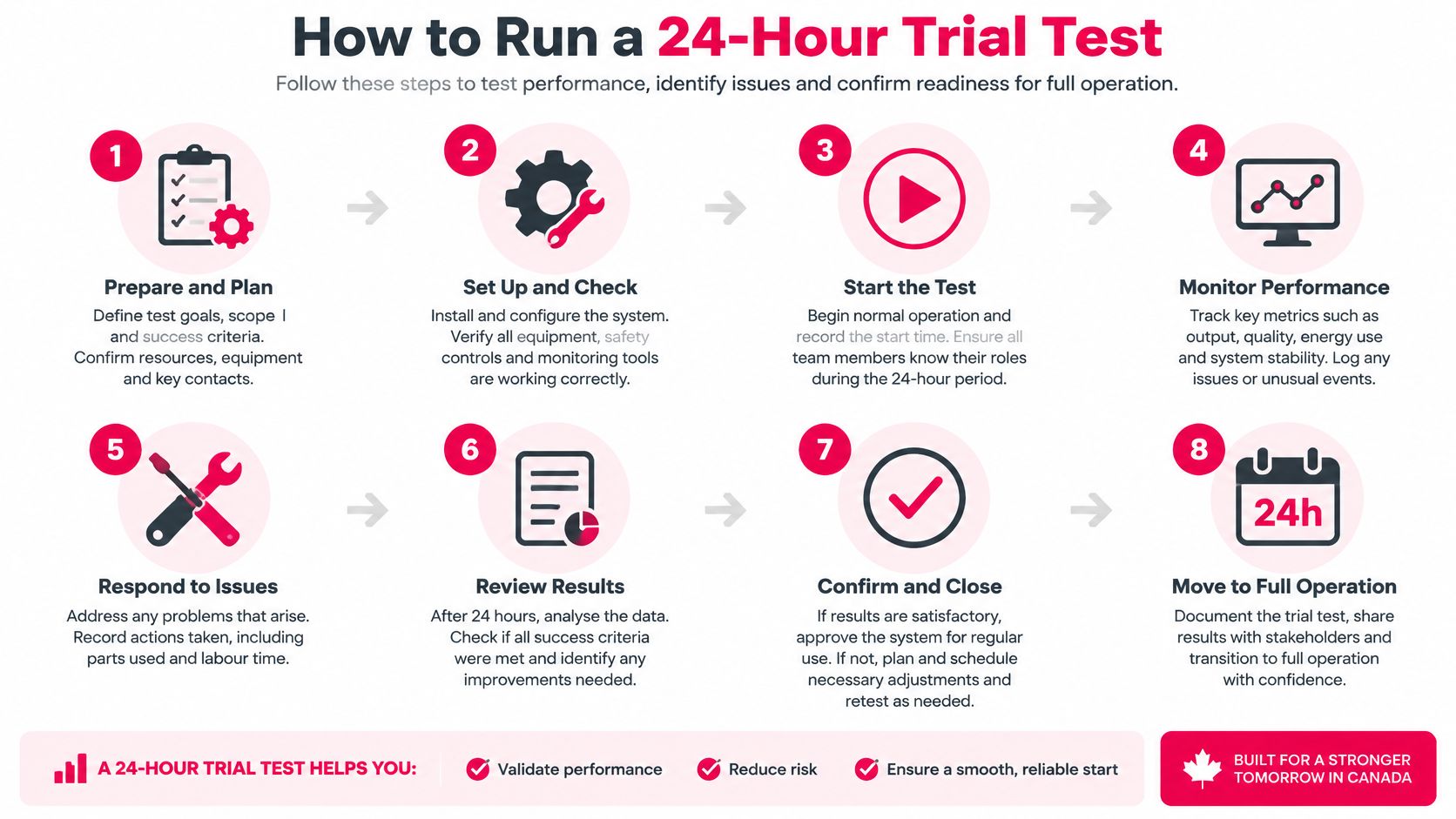
- Write down the connection count and the exact devices. List the living-room TV, a Firestick, a phone and a tablet, with the app each one will use. Devices you forget to list are the ones that fail later.
- Install and log in on every device. Note any step that takes longer than expected, because setup friction on day one tends to repeat on every reinstall.
- Test at the television location during the evening peak. Use Ethernet or 5 GHz Wi-Fi where you can. Speed measured in the kitchen at noon tells you nothing about 8 p.m. in the living room.
- Run two streams simultaneously, then add live sports or a news channel. Simultaneous load is where stalls appear, and live events are the heaviest sustained test available.
- Check the guide against broadcast times. Confirm the programme guide matches what is airing, time how long channel switching takes, and play one on-demand title from start to finish.
- Watch the data meter for the evening. Record the megabytes used during peak viewing, then compare that figure with your monthly allowance.
- Log every fault with a timestamp. Buffering, freezing, audio sync problems and sudden quality drops each get the time they happened, which turns complaints into evidence.
- Send one support question. Record how long the answer takes and whether it solves the problem. Support quality is the hardest thing to assess before paying and the easiest to test during a trial.
The decision rule: if the log shows repeated stalls in peak hours, cut the connection count or fix the network before committing to a longer term. Buying more months to save money on a connection that doesn't work is the most common expensive mistake in this category.
ROVE IPTV lists a free trial option on its website, and the current length and conditions belong on the official page rather than in an old review, so check the trial offer before you start the clock.
Affordable IPTV Canada Questions Answered
Does the checkout total match the advertised price? Confirm the CAD amount with tax applied for your province before paying, and ask whether any event or premium feed carries a surcharge. The headline monthly figure only holds if the checkout total agrees with it, which is where advertised affordability shifts.
How quickly does service start after payment? ROVE IPTV subscriptions are accessible immediately upon purchase, and every subscription comes with step-by-step setup instructions backed by 24/7 support from a Canadian-based team.
Do I need a dedicated box? No proprietary hardware is involved. The service supports all IPTV players and runs on smart TVs, streaming devices, tablets and phones, so the hardware question reduces to whether a device you already own runs a player app.
Does the subscription travel? The service streams to users worldwide, so viewing on the road comes out of the same plan rather than a second purchase.
Who answers billing questions? Terms of Use queries go to contact@iptvrove.ca. A written reply is what you keep if a charge is disputed later.
Choose a Plan You Have Tested
Three tests decide this, and none of them is the headline price.
Term. Pick the longest term whose monthly equivalent you're certain you'll use, then confirm renewal and cancellation terms in writing before paying. A discount you abandon in month four isn't a discount.
Connections. Match the connection count to the screens that run at the same time during peak hours, using the throughput you measured in the evening rather than the speed on your bill.
Evidence. Confirm every sports feed you need appears by name, and that the data allowance covers the monthly total your trial evening implies. The trial log is what turns a calculation into a decision.
ROVE IPTV is a Canadian-focused provider, with a Canadian-based support team, setup instructions included with every subscription and round-the-clock support. Its service runs on smart TVs, streaming devices, tablets and phones, and plans are priced by term and connection count.
Comparing against the wider streaming market helps calibrate what you're paying for; this comparison of the most popular streaming platforms shows how standalone services stack up on price and catalogue.
When you're ready, compare the 12-month plan for two devices, review the year-long subscription options, or check device compatibility and trial availability on the ROVE IPTV homepage. Confirm the CAD price on the official page at the time of purchase, since terms and pricing change.
ROVE IPTV gives Canadian households a way to run the arithmetic above on real plans: term lengths from one to twelve months, connection counts from one to five, live channels, sports and on-demand in one subscription, and a free trial option listed on the site so you can test a peak evening before you commit. Setup instructions come with every subscription and the support team is Canadian-based. Visit ROVE IPTV to compare plans, check your devices and start a trial on your own network.

No Responses