
What if the IPTV provider with the biggest channel count is the worst fit for your home? That's the question most comparison lists don't ask, and it's the one that matters most in Canada. A service that runs beautifully on Toronto fibre can stumble on rural fixed wireless, and a long channel list tells you nothing about whether tonight's hockey game will play. This guide teaches you to assess any IPTV provider Canada viewers are considering by scoring evidence, testing on your own network, and checking the details that decide real-world viewing.
Table of Contents
- Why Canadian Viewers Need a Different IPTV Checklist
- Seven Criteria to Score an IPTV Provider in Canada
- Canadian Channels, Live Sports and On-Demand Viewing
- Device Support, Electronic Guide and Setup
- Bandwidth and Simultaneous Connections at Home
- Plans, Prices in CAD and Connection Tiers
- Frequently Asked Questions About IPTV Providers in Canada
- Trial, Support Checks and Your Final Shortlist
Why Canadian Viewers Need a Different IPTV Checklist
Choosing an IPTV service is a lot like choosing a cell plan. The headline price gets your attention, but coverage at your address decides whether you're happy a month later. With IPTV, your "coverage" is your home internet, your devices, and the channels and events you watch.
IPTV isn't a niche experiment here. The CRTC's 2019 communications monitoring report recorded that in 2018, IPTV subscribers represented 26% of all broadcasting-distribution-undertaking subscribers. Access is now nearly universal, since Statistics Canada's quality of life hub reports 97.1% of Canadian households had access in 2024 to broadband service at download/upload speeds of at least 50/10 Mbps. Demand keeps climbing too. Statistics Canada's telecommunications statistics show average monthly data usage per Canadian high-speed residential internet subscription reached 585.5 GB in 2024, an increase of 9.7% from 2023.
Three households, three different answers
Keep three profiles in mind as you read. A Toronto household on fibre mainly needs sports reliability during big games. A Quebec family wants French and English channels playing on several screens at once. A rural home on fixed wireless has to test bandwidth before anything else. The right provider for one isn't automatically right for the others.
Before you compare anyone, gather four things:
- Must-watch list: The specific channels, leagues, and events your household won't give up.
- Device inventory: Every TV, stick, box, phone, and tablet that will stream.
- Measured speed: What your connection delivers at the TV, not what's printed on the bill.
- Simultaneous viewers: How many people watch different programmes at the same time.
It's also worth understanding the legal picture before you subscribe, so read our explainer on whether IPTV is legal in Canada and what to check. Finally, be candid with yourself about one limit. No provider can guarantee uninterrupted streaming, because your local network and last-mile connection sit outside any provider's control. A good checklist is about evidence, not promises.
Seven Criteria to Score an IPTV Provider in Canada
Brand reputation is hard to verify, so score evidence instead. Rate each of the seven criteria below from 0 to 2, giving a total out of 14. A 2 means you found clear, specific, published evidence. A 1 means partial or vague information. A 0 means you couldn't verify the claim at all.
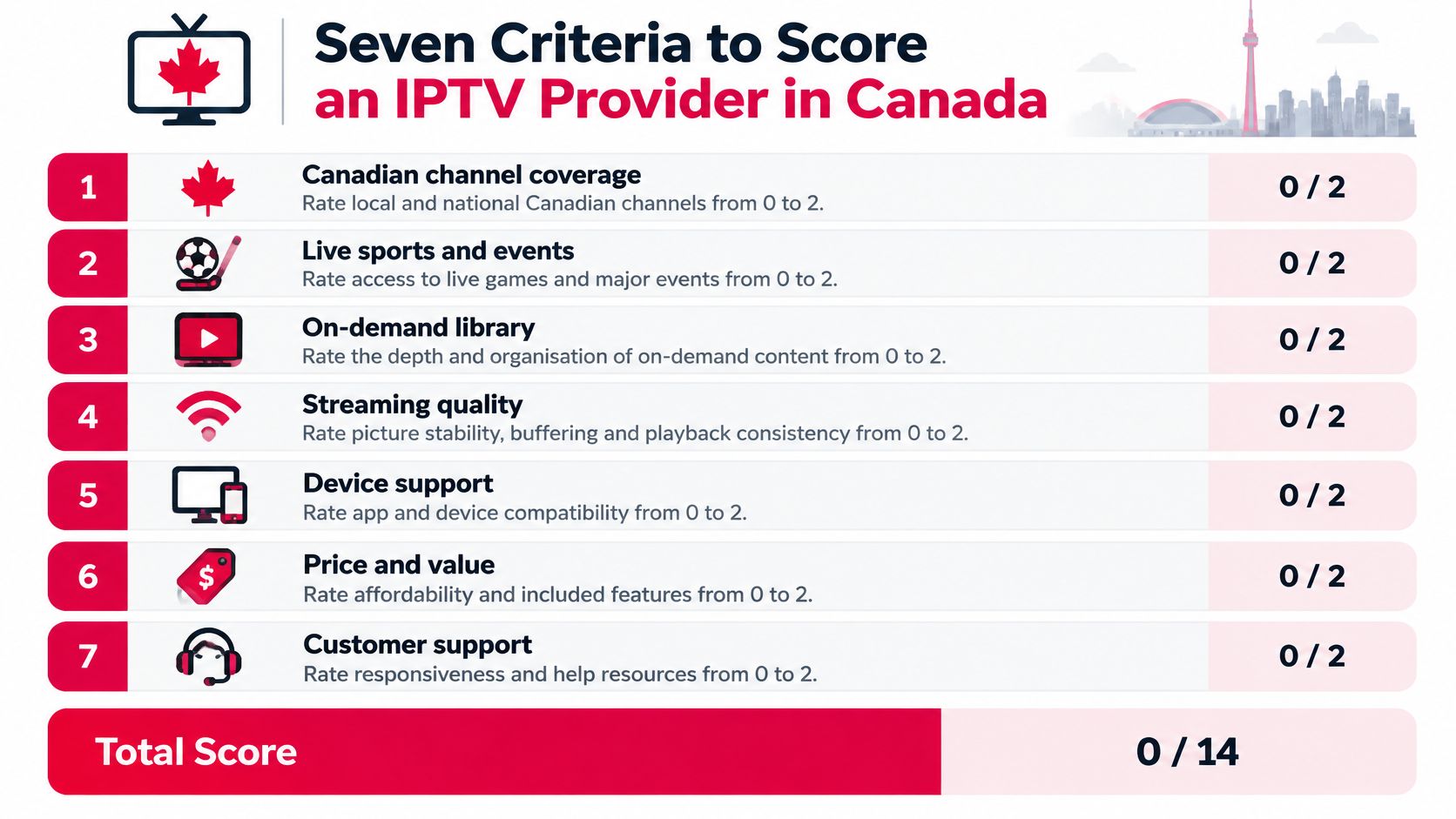
The table below is your scoring sheet. Work through it row by row on each provider's website, and write down what you found beside each score.
IPTV provider scoring criteria for Canadian viewers
| Criterion | Check before buying | Red flag |
|---|---|---|
| Canadian channel coverage | Named Canadian networks in the published channel list, plus the regional channels you watch | No channel list, or only generic international counts |
| Live sports and events | Which leagues, pay-per-view events and backup feeds are named, such as hockey, football and MMA | Claims of all sports with no event details |
| On-demand library | Browsing by country, genre, release year and popularity, and a current title count | Unstated or inconsistent catalogue size |
| Device and player support | Your exact devices and the IPTV players listed in setup guides | Only a generic works everywhere claim |
| Connections and plan terms | Number of simultaneous connections, durations, and what each plan includes | Connection limit not stated before payment |
| Trial, refund and support | Free trial terms, refund window, and a support channel with a stated response time | No trial and no written refund policy |
| Pricing transparency | Prices in CAD, whether taxes are included, and renewal terms | Prices visible only after account creation |
How the 0 to 2 scale works in practice
Say you're scoring Canadian channel coverage. A provider that publishes a channel list naming the Canadian networks you watch, plus the regional stations for your province, earns a 2. You can check your must-watch list against it in minutes. A provider that only advertises a large generic "international" count earns a 0, because there's no way to confirm your channels are included before you pay. A provider somewhere between, perhaps naming national networks but not regional ones, gets a 1.
Apply the same logic everywhere. On live sports and events, look for named leagues and event types rather than a blanket claim that everything is covered. On the on-demand library, check whether you can browse by country, genre, release year, and popularity, and whether the title count is stated consistently. For device and player support, your exact TV model or streaming stick should appear in a setup guide, not just in marketing copy. For connections and plan terms, the simultaneous connection limit and plan durations should be printed before checkout.
Two hard caps and one household rule
Raw totals can mislead, so apply three caps after you add up the scores:
- Hidden prices: If prices stay hidden until you create an account, the total cannot exceed 4, however strong the other scores look.
- Unreachable support: If there's no reachable support channel, the total cannot exceed 4 either. You'll need help eventually, usually during setup.
- Sports or connections at zero: A 0 on live sports or on connections caps the total at 8, because those two criteria decide whether the service fits how a Canadian household watches.
Practical rule: Score at least three providers on the same sheet, and note the evidence beside each number. Gaps that marketing pages hide become obvious in a side-by-side column.
The scoring takes perhaps twenty minutes per provider. That's a small investment compared with discovering, three weeks into a year-long plan, that a channel you assumed was included isn't there. Treat any claim you can't verify as a question to send support before paying, and keep the written answers with your scoresheet.
Canadian Channels, Live Sports and On-Demand Viewing
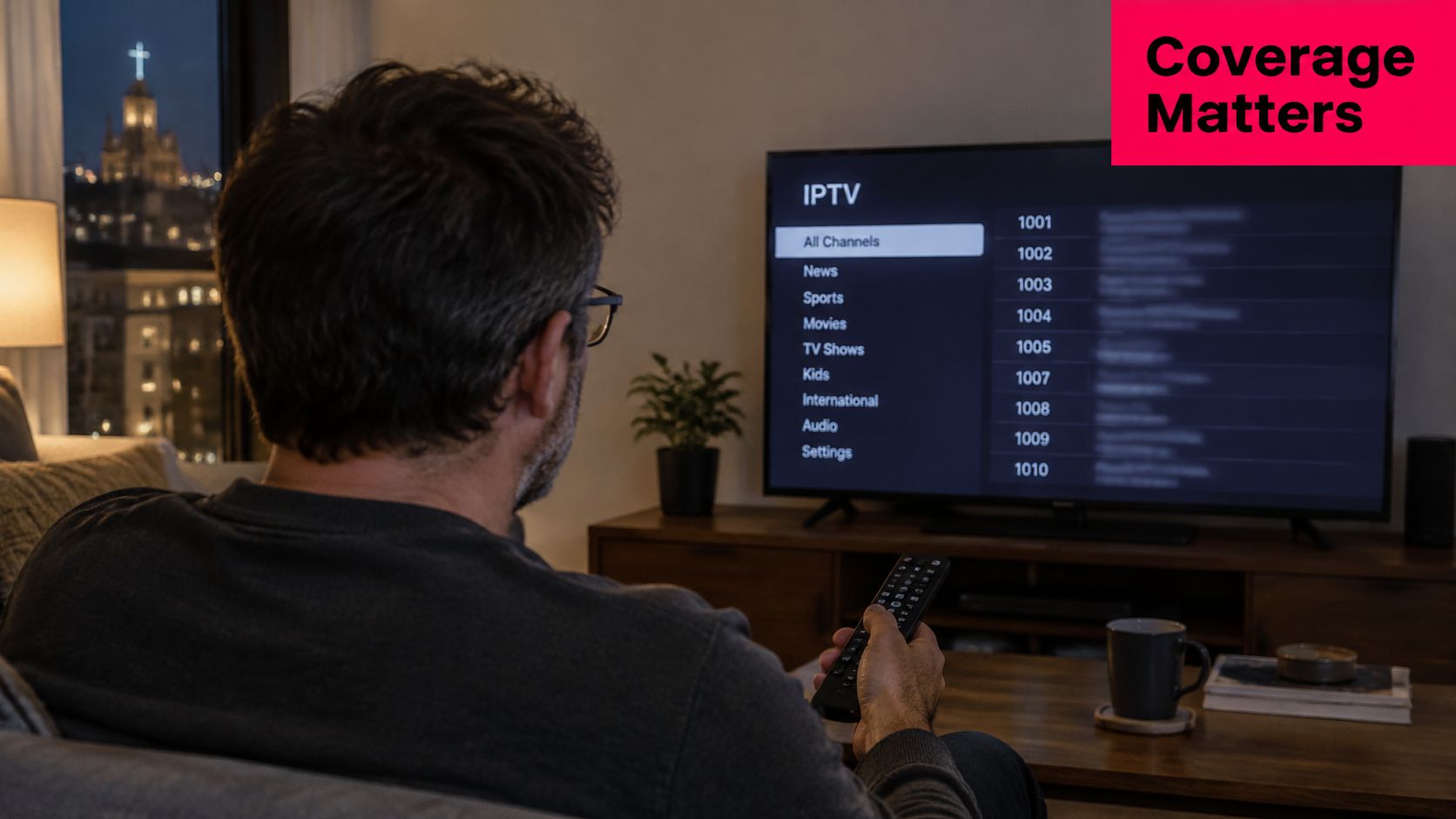
Say you're a Montreal viewer settling in on a Sunday night. You want Radio-Canada for the news and Hockey Night in Canada after it. A provider advertising thousands of channels hasn't answered your actual question, which is whether those two things are covered, live, on your TV. The photo below shows the moment this check is really about, an ordinary evening with the remote in hand.
Most Canadian buyers aren't abandoning television habits. They're looking for a hybrid replacement for cable that keeps familiar channels and adds flexibility. The CRTC's 2025 report on Canadian viewing found approximately 40% of Canadians consumed sports content on traditional television during the previous month, while under 10% did so online. Traditional TV remains the habit, so an IPTV service has to reproduce that experience dependably, especially for live events.
Four questions a channel count can't answer
Before paying, ask these in writing:
- Regional restrictions: Can regional blackouts or restrictions affect the games you follow?
- Live or replay: Are games available live, or only as replays after the event?
- Pay-per-view scope: Does pay-per-view mean every event, or only selected ones? Which ones?
- Backup feeds: What happens if the primary stream fails during overtime? Is there a backup feed you can switch to?
These questions separate channel availability from event access. A channel can be listed while a specific event on it is restricted, delayed, or missing. Even a multi-connection plan, which helps different people watch different programmes, can't guarantee simultaneous access to every major event if the source feed itself is limited. Event-level viewing guides show how specific this gets. For example, the November 6 women's hockey viewing guide from Fubo News walks through exactly where and how to watch one particular game, which is the level of detail you should expect for the events you care about.
What to look for in a published channel list
Check the published list for named Canadian networks, including CBC and Radio-Canada, CTV, Global, TSN, and Sportsnet, plus the regional channels for your province. We publish a Channels List page so you can run exactly this check, and our Canadian channels list is the place to confirm your must-watch networks before subscribing. Our live programming for Canadian viewers includes general television, sports, and pay-per-view events, with hockey, football, and MMA named, and backup streams described for TSN and Sportsnet.
One caution applies to us and to every provider. We state that our own servers are hosted locally with optic-fibre internet for streams. Treat that as a claim to confirm in writing and to test during a trial, not as proof of performance at your address.
The short video below shows the kind of on-screen browsing experience to evaluate during your own trial, including how quickly categories and guides respond.
For on-demand viewing, check whether you can browse by country, genre, release year, and popularity. That organisation matters more day to day than a headline title count, because it decides whether you can find something to watch quickly. Ask for a current title count in writing too, since published catalogue totals can vary between pages, and note the answer on your scoresheet.
Device Support, Electronic Guide and Setup
Device problems cause more buyer's remorse than channel problems, because they're discovered after payment. Start with this table, then run the five-step routine under it.
Device checks before subscribing
| Device | Check before subscribing | Source to confirm |
|---|---|---|
| Smart TVs | Model runs the required IPTV player | Provider setup guide |
| Firestick | Player installs from the device store | Provider setup guide |
| Chromecast | Casting or player method matches the guide | Provider setup guide |
| Apple TV | Player available on your tvOS version | App Store listing for your tvOS version, matched against the setup guide |
| Roku | Player available on your Roku model | Roku channel store listing for your model, matched against the setup guide |
| MAG Box | Firmware and configuration match the guide | Provider setup guide |
| Formuler | Player and firmware match the guide | Provider setup guide |
| Phones and tablets | Player available for your operating system | App store listing for your operating system version |
| Computers | Browser or desktop player works on your system | Browser check on your own machine before paying |
The device is the TV, the player is the remote
Here's the distinction readers most often miss. A device that can run apps isn't automatically a device that runs the specific IPTV player a provider requires. Think of it this way. The TV is the hardware, and the player is the remote control. If the remote doesn't match the TV, nothing changes channels, however good the screen is. That's why the setup guide, not the marketing page, is the document to trust.
A five-step setup routine
- List every screen. Write down smart TVs, Firestick, Chromecast, Apple TV, Roku, MAG Box, Formuler, phones, tablets, and computers your household will use.
- Match the player. Confirm the required player is listed for each device type in the setup guide.
- Follow the supplied instructions. Install using the step-by-step instructions provided with the subscription rather than improvising from a forum post.
- Test one device first. Get playback stable on your main TV before buying extra connections for the rest.
- Check the guide. Open the electronic programme guide, which is a guide with categories and search, and confirm you can find tonight's programmes quickly.
Our service works on smart TVs, streaming devices, tablets, smartphones, and more, and we state that we support all IPTV players for all devices. Treat that, like any provider claim, as something to test on your oldest device during a trial, since older hardware is where incompatibilities hide. Step-by-step setup instructions come with every subscription. Before buying, check your exact model and setup details on our website so the first evening is spent watching, not troubleshooting.
Bandwidth and Simultaneous Connections at Home
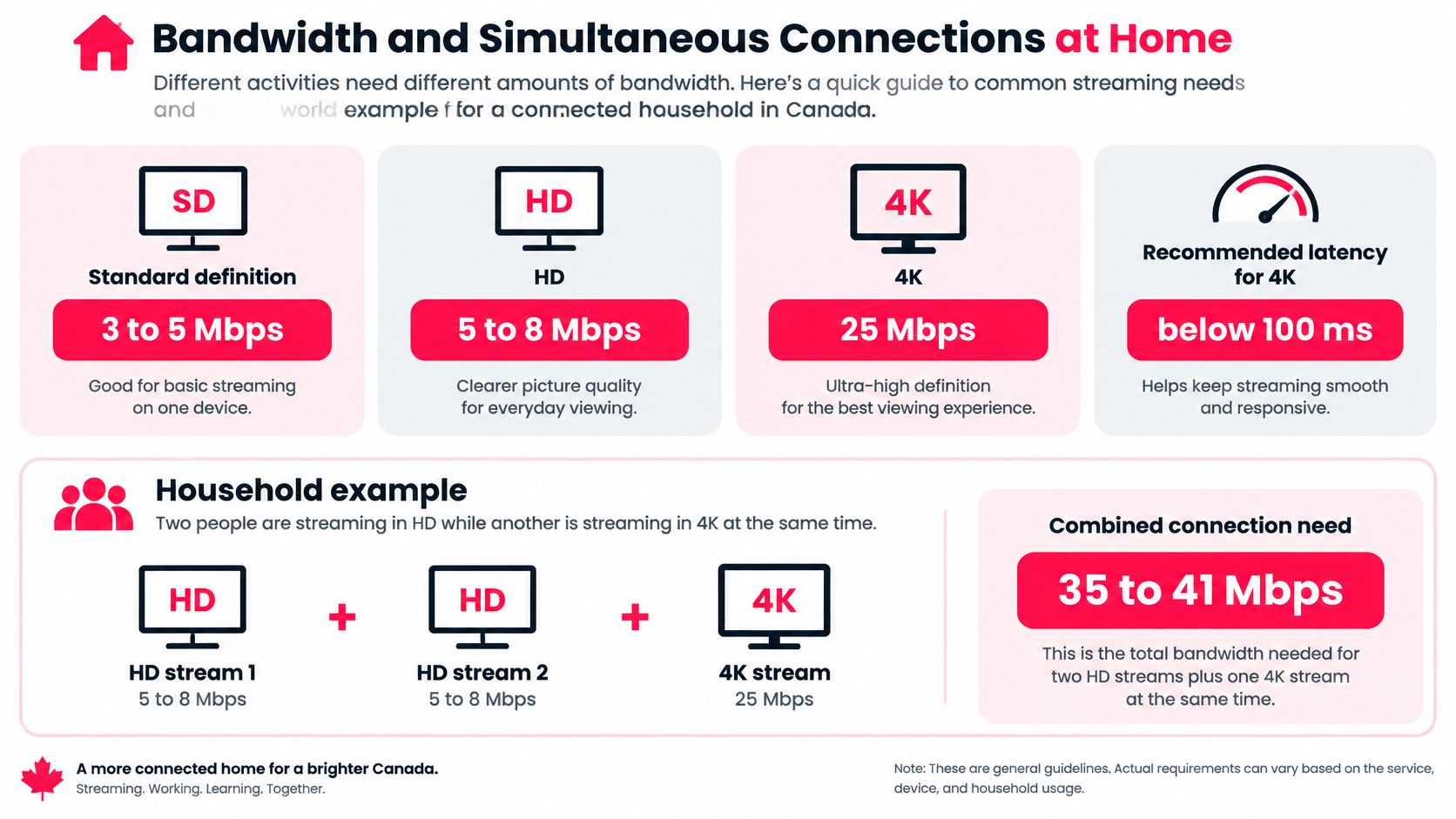
Bandwidth is simple arithmetic once you know the per-stream numbers, and it is the figure that decides whether a plan succeeds in your home. As a planning baseline, typical streams run about 3 to 5 Mbps for standard definition, 5 to 8 Mbps for HD, and 25 Mbps for 4K, with latency below 100 ms preferable for 4K viewing. Score each provider against the total your household needs at its busiest hour, since the single-stream figure alone understates real demand.
Sustained downstream needed per stream type
| Stream type | Sustained downstream | Notes |
|---|---|---|
| Standard definition | 3 to 5 Mbps | Per active stream |
| HD | 5 to 8 Mbps | Per active stream |
| 4K / Ultra HD | 25 Mbps | Keep latency below 100 ms where possible |
| Household example, two HD and one 4K | About 35 to 41 Mbps | Before gaming, cloud backups and Wi-Fi overhead |
| Household example, three HD at once | About 15 to 24 Mbps | Before other household traffic |
The connection-count trap
Three connections on a plan and three simultaneous 4K streams are two different limits. The connection count is what the provider allows. The bandwidth total is what your home network can carry, and the two get confused constantly when households shop by connection count alone.
Three 4K streams would need roughly three times the single-stream 4K figure in sustained downstream, before anyone starts a game download or a cloud backup. Geography matters here too. A downtown fibre line and a rural fixed-wireless connection can show the same advertised speed on paper yet behave very differently at 8 p.m., when the whole neighbourhood is online. Just as often, the bottleneck sits inside the house, at the Wi-Fi link between the router and the TV. Learning how to optimize Wi-Fi coverage at home frequently does more for evening picture quality than upgrading the internet plan itself.
Test like you watch
Run your tests the way you will watch:
- At the viewing location: Measure speed beside the TV rather than beside the router.
- At the evening peak: Test between supper and bedtime, when your street and your household are both busy.
- Wired versus wireless: Compare wired Ethernet against 5 GHz Wi-Fi on the same device. Wired usually wins for high-bitrate viewing.
- During a live event: A quiet Tuesday morning test says little about a Saturday night game.
An advertised plan speed is a ceiling. What reaches your TV at 8 p.m. is the number that decides your picture.
Two details on our side are relevant here. ROVE IPTV evenly distributes customer subscriptions across its servers, and it delivers high-definition streams directly to your device. Treat those, like any provider claim, as things to verify during a trial, because no server arrangement can repair a congested last-mile connection and no provider can guarantee uninterrupted streaming.
Before you commit, ask any provider one direct question. What happens to the picture on your service when my measured throughput drops during a live game? A clear answer that describes step-down behaviour instead of promising perfection is a good sign. A vague one earns a 1 or a 0 on your scoresheet.
Plans, Prices in CAD and Connection Tiers
A plan price only becomes useful after it is converted into cost per screen. Start with the verified example: our 1 Year Subscription for 3 Devices is $199.99 CAD, taxes included, which works out to about $16.67 per month and about $5.56 per connection per month. A limited-time 30% discount is advertised across all plans, so use the live checkout figure for scoring rather than a number copied from an older page.
The structure is closer to a cell plan than a cable contract. You pick a term of one, three, six, or twelve months, then pick one to five simultaneous connections at purchase. Plans are sold without contracts or automatic payments, so renewal means buying another term rather than escaping a billing cycle. Prices are listed in Canadian dollars with applicable taxes included; the remaining term and connection combinations are priced on the website.
The cost-per-connection method
Divide the price by months, then divide again by connections. That gives cost per connection per month, the only figure that stays comparable when one provider sells short terms and another sells annual bundles. A plan that looks cheap because the sticker is small can be expensive if it covers only one screen.
Use the verified example as the template: $199.99 across 12 months is $16.67 monthly, and across 3 connections is $5.56 per screen each month. Apply the same arithmetic to any competitor before judging a promotion. Then weigh term length as risk management. A short term costs more monthly but leaves room to test urban fibre, rural fixed-wireless, and a busy sports night before committing. A longer term lowers the monthly rate, so it makes sense only after the service has cleared those conditions. No provider can promise uninterrupted streaming, and live sports are fragmented across platforms, so judge a tier by whether your must-watch events hold up on your connection.
Why total household cost matters
IPTV usually sits beside other subscriptions, so judge it inside the whole viewing budget. Statistics Canada reports Canadian households spent $11.3 billion on cable, satellite, and other program-distribution services, including streaming services, in 2024, slightly below $11.4 billion in 2023, and that prices for video and audio subscription services rose 21.0% between 2019 and 2024. The practical point: a lower IPTV bill can still be poor value if you keep paying for overlapping services to reach scattered sports rights.
Before paying any provider, get written answers to three questions: Is the displayed price final with taxes included? Does renewal happen automatically or manually? Is there any contract or cancellation condition beyond the term bought? On our side, the answers are taxes included, manual repurchase, and no added contract. For competitors, treat unclear answers as a score, not a mystery to solve after checkout.
Frequently Asked Questions About IPTV Providers in Canada
Does a three-connection plan let three 4K streams run at once
Not by itself. Connection count and bandwidth are separate limits, and both have to hold. Using the per-stream guidance from the bandwidth table, three simultaneous 4K streams need roughly three times the single 4K rate in sustained downstream, about 75 Mbps before other household traffic, so test your evening throughput at each TV first.
Will every hockey or football game be available live
Not guaranteed, with us or anyone else. Channel carriage, event rights, regional restrictions, and occasional stream failures are separate issues, and a listed channel doesn't settle all four. Ask for event-level details about the leagues you follow instead of relying on a channel count.
Is there a free trial, and does it need a credit card
We advertise a 24-hour trial with no credit card required. That gives you time to test your main device and one live event if you time it well. Confirm the current terms in writing before you rely on them, since trial conditions can change.
Can I get a refund if the service doesn't suit my home
We advertise a seven-day money-back policy. Read the conditions before paying, note the deadline on your calendar, and run your tests inside that window rather than after it. A refund policy you discover on day nine doesn't help you.
Do I need wired internet for IPTV
No, wired internet isn't required. That said, wired Ethernet or a strong 5 GHz Wi-Fi signal is the safer choice for high-bitrate devices like a 4K television. If you can't run a cable, test wireless playback at the TV during the evening peak before committing.
One last regional check. Quebec viewers should confirm the published list includes the French-language networks they watch, such as Radio-Canada, and the same principle applies in every province. Your regional channels are part of your must-watch list, not an afterthought.
Trial, Support Checks and Your Final Shortlist
Testing matters more in Canada than a speed advertisement suggests. The CRTC's 2025 Canadian Telecommunications Market Report reports more than 95% of Canadians can access 50/10 Mbps service, yet rural communities, First Nations reserve areas, and the Territories remain below the national average. An advertised plan, in other words, isn't proof of clean playback in your living room. Your trial is the proof.
A three-part trial routine
Use the trial window deliberately rather than browsing casually:
- First hour, main device: Set up your primary TV, open the guide, and watch something familiar so picture problems stand out.
- Evening peak, second device: Start a stream on a second screen during the busiest hours and check both devices for buffering or quality drops.
- Live sports event: Watch a real game, and if the provider names a backup feed for that channel, switch to it once so you know how before overtime forces the issue.
Our Free Trial option is listed on our website, and you can review the current free trial terms for Canadian viewers before starting. We advertise a 24-hour trial with no credit card, a seven-day money-back policy, step-by-step setup instructions with every subscription backed by 24/7 customer support, and a Canadian-based support team reachable by email and WhatsApp. Confirm each of those in writing, because they're claims to verify, not reasons to skip testing.
Test support before you need it. Send one specific question, such as which player your TV model requires, and record how long a useful answer takes. Write that response time on your scoresheet under the support criterion.
Six steps to a decision
- List your requirements. Must-watch channels, sports, devices, and simultaneous viewers, all on one page.
- Shortlist three providers. Score each with the seven criteria and apply the caps.
- Confirm plan terms. Verify the connection count you need, the term, taxes, and renewal behaviour.
- Run the trial properly. Use your real devices, at peak hours, during a live event.
- Check the safety net. Read the refund terms and record the support response time.
- Buy short first. Choose the shortest term that covers your test period, then extend once you're satisfied.
Return to the three households. The Toronto fibre household should weight the live-event trial and backup feeds most heavily. The Quebec family should weight French and English channel coverage and enough connections for separate screens. The rural fixed-wireless home should weight the bandwidth test above everything, because no channel list compensates for a connection that can't carry the stream. No provider can promise uninterrupted streaming, so let your own trial evidence make the final call, and review the trial terms on our website when you're ready to run it.
If you're comparing providers for Canadian channels, live sports, and on-demand viewing across your household's devices, ROVE IPTV offers subscription plans in CAD by term and connection count, with a published channel list, setup instructions, and a free trial option to evaluate. Score us with the same seven criteria you'd apply to anyone else, run the trial during a live event on your own network, and let that evidence decide.

No Responses