

How many Arabic channels does it carry? That is the figure Canadian buyers ask about first, and the one that answers least. A count tells you what a seller claims to hold, the way a storefront sign announces stock without proving what sits on the shelf. It says nothing about whether those channels are cleared for Canadian viewing, whether the guide renders Arabic titles on your television instead of empty boxes, or whether a stream survives 8 pm on a Tuesday when the rest of the household is online.
Judge a service on evidence, in a set order. Start with proof of content and rights: which named Arabic channels does it carry, and who holds the Canadian rights to them? Then move to your own hardware. Does the guide display Arabic correctly on your screen? Does one live channel hold for half an hour at peak on your connection? Each check runs at home, on the devices your household already owns, in a single evening.
This walkthrough is built for a Montréal or Toronto household sitting down with a laptop, a streaming stick and a printed checklist. What you gather before paying is proof, and proof settles most of the decision.
Table of Contents
- Who Arabic IPTV in Canada Serves and Why It Matters
- Nine Checks That Separate a Usable Arabic IPTV Service
- How to Verify Arabic Channels and On-Demand Titles
- Judging Live TV, Sports and Stream Reliability
- Devices, Simultaneous Connections and Home Network Fit
- How to Set Up and Test Arabic IPTV in One Evening
- Decide on a Trial Only After the Checks Pass
Who Arabic IPTV in Canada Serves and Why It Matters

A household in Montréal's Saint-Laurent plugs a borrowed Firestick into the second TV and spends an evening looking for the news bulletin from Beirut. The picture arrives, then stalls. The guide lists the channel in English. Half an hour later the same stream plays cleanly. Nothing is broken, exactly. Nothing has been checked either.
That household sits inside a large audience. Statistics Canada's 2021 Census analysis counted 838,045 people who knew Arabic well enough to hold a conversation, 643,740 who spoke it regularly at home and 626,070 who named it as their mother tongue, and a wider Arab population of 795,665 people, or 2.2% of Canada, concentrated in the two biggest media markets: 41.6% in Quebec and 40.2% in Ontario, 81.8% of that population between the two provinces.
Demand does not stop at the first generation. 57.5% of Canadian-born Arabs knew Arabic well enough to converse in 2021, and among Arabs born outside Canada, 75.6% spoke Arabic regularly at home, according to Statistics Canada's 2025 study. Arabic IPTV, meaning Arabic-language live channels and on-demand titles delivered over the internet to a TV, phone, tablet or streaming stick, has to serve both groups at once. In many homes those two groups sit under the same roof, so a single subscription needs to cover live news and a searchable film library in the same evening.
Delivery itself is mainstream now. The CRTC's 2024 broadcasting report shows IPTV penetration rising from 20% of Canadian households in 2019 to 35% in 2023. That figure describes the delivery market as a whole; it cannot vouch for one seller's rights, catalogue or picture quality.
Three viewers sit in those households, and each one tests something different:
- The first-generation viewer wants a named channel from home, at the hour it airs there, with the presenters they know. Anything less feels like a substitute.
- The younger or Canadian-born viewer moves between Arabic, English and French in a single evening, and wants search that works in either script, subtitles that are labelled, and a menu they can hand to a friend.
- The mixed household puts news on one screen, a match on a second and a film on a third, which turns the connection limit into the main constraint rather than the channel count.
Rural and northern homes add a fourth test, because the connection available in a city core may not exist at the end of a county road. The census counts explain why the audience exists. They do not tell you whether a particular seller can serve it.
Nine Checks That Separate a Usable Arabic IPTV Service
Price is usually the first comparison a household makes, and channel count is the second. Both should come last. Nine checks sit ahead of them, and the whole set takes one sitting to run on your own devices.
The checklist works like a home inspection. You would not negotiate a mortgage before someone looked at the foundation, and the channel list is the foundation here. Proof that the Arabic content exists, and that the seller can show it to you in Canada, outranks every other row.
Arabic IPTV checklist: what to verify and what a good answer looks like
| Check | What to Verify | Pass Signal | Red Flag |
|---|---|---|---|
| Arabic channel list | Named Arabic channels and their country of origin | Full list published before purchase | Vague claims such as thousands of channels |
| Arabic guide (EPG) | Arabic titles and schedule display correctly | Readable Arabic script and correct local times | Boxes, question marks or English-only labels |
| Live sports coverage | Named leagues, broadcasters and events | Specific channels listed for each sport | Only the words all sports |
| Arabic on-demand library | Arabic category or language filter | Arabic films and series can be found and played | No language labelling on titles |
| Supported devices | Named devices and apps | Setup guide for each device type | No device list or setup guide |
| Simultaneous connections | Number of screens that can play at once | Limit stated on the plan | Limit not stated anywhere |
| Trial and refund terms | Trial length, card requirement and refund route | Written terms on the website | Terms available only in chat |
| Support | Hours, channels and languages | Published support hours and contact details | Contact only through social media |
| Pricing in CAD | Price, term length, taxes and renewal | Prices in Canadian dollars with tax treatment shown | Prices in another currency or unclear totals |
Work through the rows in order, because they do not carry equal weight. The first three decide whether the Arabic content you want is present and usable, so they outrank everything below them on their own. A cheap plan for channels you can't watch is wasted money.
Channel totals prove volume, nothing more. A seller can advertise thousands of entries and still hold no rights for the handful you watch. Ask which rights cover Canadian viewing for each named channel, and treat a vague answer as the answer it is.
Working rule: a service that passes seven or more checks, with its terms written on the site, earns a test evening. A service that fails two of the first three doesn't earn a paid plan at any price.
That test evening matters because no provider can guarantee an uninterrupted stream. What you can verify is how the service behaves on your own network at the hours you watch, and how clearly the seller answers the nine rows above before money changes hands.
For the pricing row itself, write down four things: the amount in Canadian dollars, the term length, whether tax is included, and whether the plan renews automatically. Then screenshot every page you read those terms on, including the channel list and the device page. Terms change, and a dated screenshot is the difference between a refund conversation that goes somewhere and one that stalls.
How to Verify Arabic Channels and On-Demand Titles
Start with the channel list the provider publishes, not the sales page that promises thousands of channels. Then run six checks in one sitting, on the equipment you own.
- Find three channels twice. Search each one by its Arabic name and again by its Latin transliteration, because a guide that handles only one spelling will miss the other half of your list.
- Open the guide in the evening. Read the Arabic titles for boxes, question marks or Latin-only text, and compare the displayed start times with the channel's own local time, since a schedule shifted by a time zone is a schedule you can't record from.
- Search one film you know well. Try it in Arabic script first, then in transliteration, and compare the results. Matches in both places mean the catalogue normalizes spelling variants rather than storing one raw string per title.
- Open a series and check the language fields. Audio and subtitle options should carry language names, not a single unlabelled track you have to guess at.
- Repeat steps two to four on a second device. A guide that renders beautifully in a browser can fail on a smart TV, because the television's font and text direction handling are doing the drawing, not your laptop.
- Write down every mismatch and ask, in writing, which rights cover each named channel for Canadian viewing. The reply tells you whether the seller knows their own catalogue or is repeating a supplier's marketing.
These steps expose something specific. A guide built for Arabic-speaking viewers shows Arabic script, right-to-left layout and country tags. A guide translated afterwards shows transliterations, generic genre names and English-only labels, and no amount of extra channels fixes that.
The scale of that design problem is visible in the census. Statistics Canada's linguistic diversity portrait of the 2021 Census counted 323,025 Arabic speakers within Canada's immigrant population, which is why catalogue systems have to store Unicode Arabic correctly, render right to left, and expose multiple language fields rather than replacing Arabic labels with translated text.
Arabic content also covers multiple countries, not just one. In 2021, 10.3% of the Arab population was born in Lebanon, 10.0% in Syria, 7.0% in Iraq and 6.8% in the Arabian Peninsula, while 30.3% were born in Canada, according to Statistics Canada's language release. One generic "Arabic" genre label cannot capture that diversity. Country filters and named channels will. Compare what you find against a published IPTV Canada channels list and note which of your three channels appear there by name.
Judging Live TV, Sports and Stream Reliability
A slow service and an unstable one look identical on screen and behave nothing alike underneath. Slow means the picture takes a moment to appear. Unstable means the stream freezes mid-sentence, the audio drifts out of sync, or the player reloads itself. Bandwidth is the size of the pipe into your home, while stability is whether traffic flows through it evenly. Freezing comes from latency, jitter and packet loss rather than raw bandwidth.
The measurements make the gap concrete. The CRTC's broadband measurement report recorded average idle latency of 37 to 39 ms, but latency during heavy use reached as high as 415 ms, and the regulator notes that users commonly notice problems above 100 ms. A provider's server location means little next to that. What matters is peak-hour latency and jitter on your own connection, on your own devices.
The half-hour test that tells you the truth
Pick a weeknight between 7 and 10 pm as your test window. Testing then, rather than on a quiet afternoon, is what exposes the kind of heavy-use latency the report measured. Watch one live channel for at least 30 minutes without touching anything. Note freezes, audio drift and reloads with the time they happened. Run the test on one of the Arabic channels you shortlisted earlier, then repeat it on a second evening, because one clean night proves nothing about congestion.
Adaptive bitrate does part of this work for you: when throughput falls, the player switches to a lower video profile so playback continues. That helps with short dips. It cannot compensate for severe queueing delay or packet loss, which is why a service can look soft and grainy at exactly the moment your neighbour starts streaming hockey.
Three outcomes for a sports channel
Sports separates the honest sellers from the vague ones, and every match you want falls into one of three buckets:
- Licensed for Canada. The provider names the league and the channel, and can tell you where the Canadian rights sit.
- Unclear rights. The channel appears on the list, the seller can't explain the source, and you're betting on nothing.
- A feed that can vanish. The CRTC explains that online access depends on territorial distribution rights, and that geoblocking can occur when a service hasn't acquired Canadian rights for particular programming, as set out in its guide to online music and television access. A long international lineup is not evidence of authorized Canadian access.
Check which bucket applies before you weigh channel counts or prices. A stable stream of a feed that disappears mid-season is no bargain.
Size the connection against the stream mix rather than a single headline speed. The figures below are typical planning ranges for matching a plan to a household, not a promise about any one service.
| Stream mix | Estimated download | Basis |
|---|---|---|
| One HD stream | 5–8 Mbps | Typical per-stream HD range |
| One 4K stream | About 25 Mbps | Typical per-stream 4K figure |
| Three HD streams | 15–24 Mbps | Three streams at the HD range |
| Two HD streams plus one 4K stream | About 35–41 Mbps | HD range plus the 4K figure, before other household traffic |
Leave headroom above those totals for phones, video calls and updates. For a second opinion on what other households watch and how live services compare, these streaming TV picks from DBotMaker are a useful cross-reference while you build your own shortlist.
No provider can guarantee uninterrupted streaming. Judge reliability on your own 30-minute peak-hour test, not on an uptime badge on a sales page.
Keep a dated note of any channel that failed, with the time and the symptom. If you later ask for a refund or file a complaint, that note is your evidence, and it is far more persuasive than "it buffers sometimes."
Devices, Simultaneous Connections and Home Network Fit
Check each screen separately, because a phone app does not guarantee a smart TV app. Every screen needs its own setup route and its own first check before a trial starts.
On each row below, run the Arabic-specific check first. A device that plays live channels but mangles right-to-left guide text has already failed, no matter how long its channel list looks.
| Device | Typical Setup Route | What to Check First |
|---|---|---|
| Smart TV | Native app or provider portal login | Confirm the app is available for your TV model and software version |
| Streaming stick | App or player install | Confirm the Arabic guide displays correctly on the stick |
| Apple TV or Roku-style box | App store install | Confirm the app is listed for your region |
| Set-top box | Portal or player configuration | Confirm the box firmware supports the chosen player |
| Phone or tablet | App or browser login | Check background playback and battery use during a live channel |
| Computer | Browser or desktop app | Confirm Arabic script, subtitles and full-screen live playback |
Each active stream consumes bandwidth and counts against the plan's connection limit, so a home where two people watch football and one watches a drama needs three connections, not one. Run your checks during your busiest evening hour, on the same home network the screens will use, because a phone test on a quiet afternoon says little about the living-room television at night. If a provider won't print the limit, that's the sixth row of the checklist failing.
Internet access is widespread but not universal, which matters outside the cities. The CRTC's 2024 communications monitoring report reported that 93.8% of Canadian households had access to Internet services in 2023–24, while 99.5% had access to the latest generally deployed mobile wireless technology. Availability is not the same as speed, latency or a data allowance that survives 4K, so homes on wireless or satellite should test before committing to a long term.
Counting method: list every screen that will play at once during your busiest hour, then match that number to the connection limit on the plan. Screens you own but never stream at the same time don't count.
Wiring the main streaming device to the router with Ethernet usually beats Wi-Fi for steady playback. A router sitting two rooms away from one television can cause buffering on that screen alone while everything else looks fine, which is why the per-device checks above matter even inside a single room. The guide to IPTV on multiple devices in Canada covers the per-device setup routes in more detail. Write your device list down before any trial begins, while the screens and the router are in front of you.
How to Set Up and Test Arabic IPTV in One Evening
Can one evening show whether the Arabic channels you have already checked will play on your own devices and network? Set aside time to follow the setup instructions, confirm the guide and favourites survive a restart, and record any fault clearly.
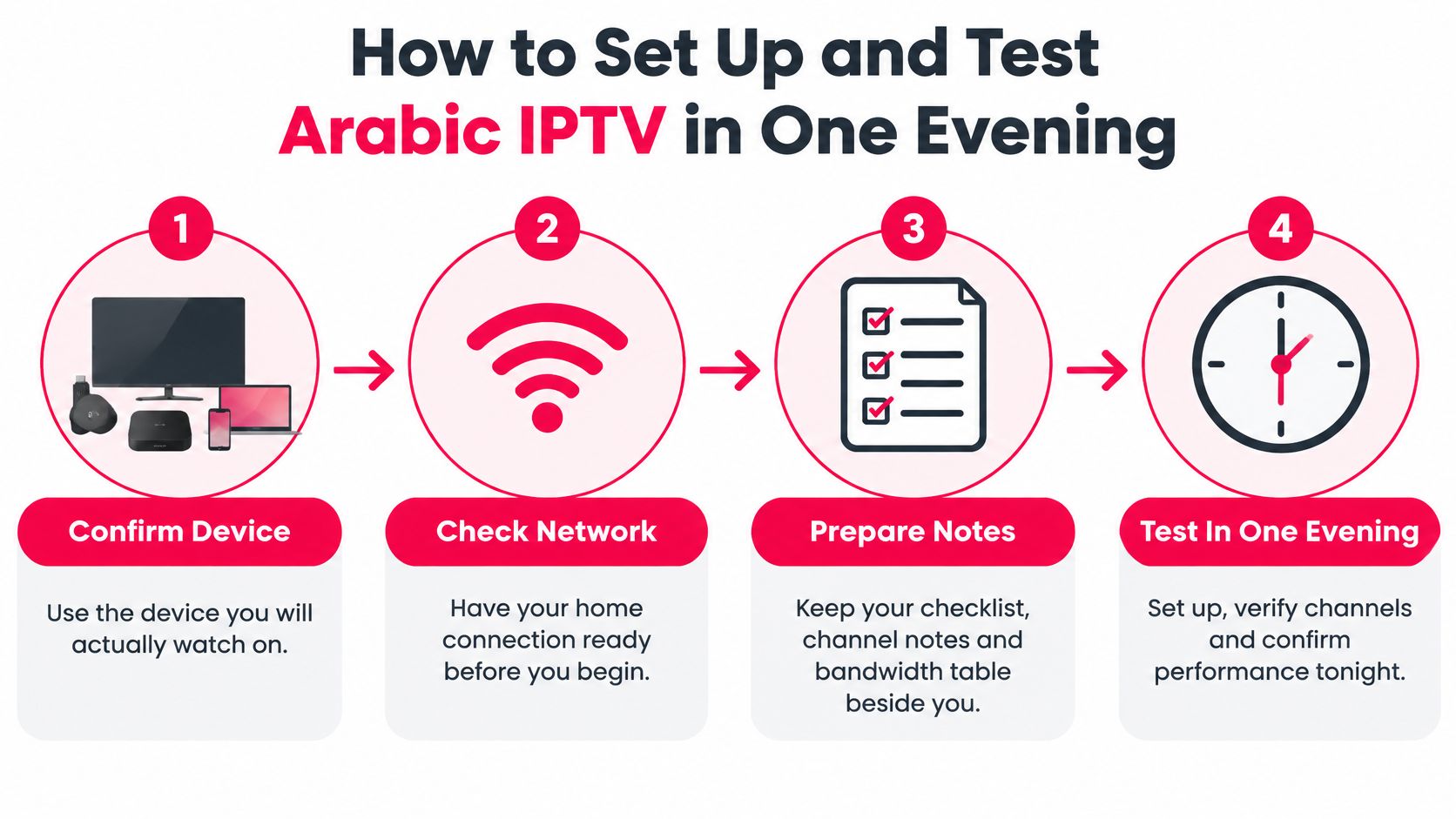
- Confirm the hardware. Note the exact model and operating system of the TV, stick, set-top box, phone or computer you plan to use. Match it to a published app or player, and ask support which option applies if your model is not listed.
- Test the connection on that same path. Run a speed test on the device itself, not a laptop in another room. Compare the result with the stream-mix figures you recorded, allowing for other household internet use.
- Install from the written instructions. Every ROVE IPTV subscription includes step-by-step setup instructions and 24/7 customer support. Follow the instructions for your device rather than guessing which player build or portal address to use.
- Log in once and save it. Check that the device appears in the account's connection count. If it does not, check the player profile before changing the password.
- Set the Arabic guide and favourites, then restart. Restart before judging the guide: settings that disappear after a reboot were held only in memory. Check that Arabic labels, right-to-left text and local times remain in place.
- Play one live channel and one on-demand title. Run the half-hour test from the reliability section on a channel you have already verified, then try a title from the on-demand library. This checks access to the content you want, not just whether the app opens.
- Record the device, channel, time and symptom. A note with these details gives support a useful starting point for distinguishing a device issue from a network or service fault. “It doesn't work” is harder to investigate.
If playback stalls, a latency and packet-loss check can help you distinguish a home network problem from a provider or channel-feed issue. These connectivity checks for site reliability teams explain how to read a ping and loss test. No provider can guarantee uninterrupted streaming.
Finish with a clear result: the guide and favourites survive a restart, and the verified live channel and on-demand title play, or you have a written fault report ready to send to support.
Decide on a Trial Only After the Checks Pass
Have the Arabic channels you care about already shown their real names, and has the guide held on your own TV? A trial confirms those results on your evening connection, once price, term and screen count are already clear.
Match four items from your screenshots in one pass: the current price in Canadian dollars with the tax treatment stated, the term length and whether the plan renews on its own, the connection limit against the screens you counted, and the Arabic channel names you verified.
When those names, the Arabic guide and the evening playback held, and the screen count fits, activate a trial. Two failures among the first three checklist rows are a reason to stop. A lower price does not restore channels that never appeared.
ROVE IPTV is one Canadian option for this sequence. The Canada free trial terms page lists the current trial conditions, while annual plan options and the 12 Months IPTV Subscription Canada – 2 Devices listing show term lengths, connection allowances and what each plan includes, so you can match them to your screen count. Check the published device list on the site before you assume a particular TV or stick will play cleanly.
Read the live trial and refund wording rather than trusting an older trial length. Refund requests go through customer support at contact@iptvrove.ca, and the support team is Canadian-based. Send the written fault list from your test. Subscribe only if playback on your own devices looks acceptable, because no provider can promise uninterrupted streaming.
ROVE IPTV gives Canadian households a way to run this sequence on their own equipment: live channels, on-demand titles, a working guide and plans built around one to five simultaneous connections, with setup notes supplied for each device. Start with the free trial, run the Arabic guide and your three named channels on the home network in the evening, then pick the term that matches the screens you use. Visit ROVE IPTV to compare the plans and confirm compatibility for your TV, Firestick or set-top box before you commit.

No Responses