
A ROVE IPTV free trial in Canada gives you 24 hours of full access to HD channels, with no credit card and no payment needed. Check when that window starts and ends, and read the refund wording, before you sign up.
Most buyers treat a trial like a preview of the channel list. They scroll, see familiar names, and pay. That leaves the harder question unanswered. Will the picture hold on your connection, on the TV you use, during a live game, before those 24 hours run out?
A short test can show the interface, the catalogue, and whether a device will log in. It cannot, by itself, prove evening sports performance or whether your monthly data allowance can absorb the hours you watch. The order below starts before any app is installed. You check the provider, then measure data, channels, and a live broadcast, and you decide from those results rather than from the headline terms.
Table of Contents
- What the IPTV Free Trial Includes
- Verify the Provider Before You Start
- Set Up Your Device Before the Clock Starts
- Test Live Channels, Guide and On-Demand Titles
- Measure Bandwidth and Data Use on Your Connection
- Stress-Test Live Sports Before You Pay
- Decide Whether to Subscribe After Your Trial
What the IPTV Free Trial Includes
A Canadian IPTV free trial from ROVE IPTV gives 24 hours of access to HD channels, and signup does not ask for a credit card or a payment. Read each row below before you activate anything, because the window is too short to discover a term halfway through.
| Term | What the trial offers | What to check |
|---|---|---|
| Trial length | 24 hours of access | Confirm when the window starts |
| Payment details | No credit card or payment needed | Confirm at signup that no card is requested |
| Picture quality | Full access to HD channels | Test 4K separately if needed |
| Subscription periods | 1, 3, 6 or 12 months | Compare CAD prices on the plan page |
| Simultaneous connections | 1 to 5 devices | Match the number to your household |
| Contracts and renewals | No contract and no automatic payment | Confirm renewal rules in the terms |
| Refunds | Not provided for subscriptions bought after the trial period | Read the refund wording before buying |
Trial length is 24 hours, so write down the exact start and the exact end. If the clock begins when the login is issued, not when you first press play, evening setup can eat the best testing hours.
Payment details should stay empty. If a form asks for a card before the trial opens, stop and confirm you are on the trial path, not a paid plan.
Picture quality on the trial is HD. A 4K or 8K plan is a separate check. Do not treat a sharp HD picture as proof that a 4K sports feed will behave the same way.
Subscription periods run 1, 3, 6, or 12 months. Prices are in Canadian dollars on the plan page, and they can change, so compare them at the moment you are ready to buy, not from an old screenshot.
Simultaneous connections run from 1 to 5 devices. A couple who never watch at the same time does not need five. A household with a living-room TV and a tablet in another room should test the number they would pay for.
There is no contract and no automatic payment. That lowers the chance of a surprise renewal. It does not replace reading the renewal rules.
Refunds are not provided for subscriptions bought after the trial period. Read that line before you pay, not after a disappointing second week.
Practical rule: Note the start time and write a one-page testing plan before you activate, so the hours go to channels, data, and a live game instead of setup.
Verify the Provider Before You Start
Does a free trial prove that a service has the rights to distribute its channels in Canada? No. A trial can show whether the login works and let you inspect the service, but it cannot establish distribution rights or guarantee that a channel lineup will remain unchanged.
The CRTC distinguishes ordinary online distribution from services that redistribute audio or video without authorization. Its guidance also discusses legal models that meet viewers' needs. For a practical introduction to the rights questions, see this guide to whether IPTV is legal in Canada.
Six checks before any login
- Business identity. Confirm you are dealing with Rove IPTV Canada through its official website, iptvrove.ca. A recognisable service name helps you identify who is providing the offer.
- Rights and distribution. Look for clear information about how the channels are distributed. A working stream demonstrates access, not authorization.
- Terms and refunds. Read the terms before committing. ROVE IPTV states that transactions are final and does not provide refunds for subscriptions purchased after the free trial.
- App permissions. If you install a player, check what permissions it requests. Permissions unrelated to video playback deserve scrutiny.
- Support. ROVE IPTV's support team is Canadian-based. If you have a technical issue during the trial, contact the team for help.
- Personal and payment information. The free trial requires no credit card or payment. Before entering any details for a later purchase, make sure you understand where and why they are being requested.
What a friendly offer still does not prove
A no-card trial means you can try the service without entering payment details. It does not settle questions about channel rights or promise that every programme will remain available. Keep the trial confirmation and terms handy so you can refer to what was offered.
Questions about the ROVE IPTV Terms of Use can be sent to contact@iptvrove.ca. Ask while you are evaluating the service, before deciding whether to subscribe.
A clear signup process helps you identify the provider. It does not, by itself, establish distribution rights.
Set Up Your Device Before the Clock Starts
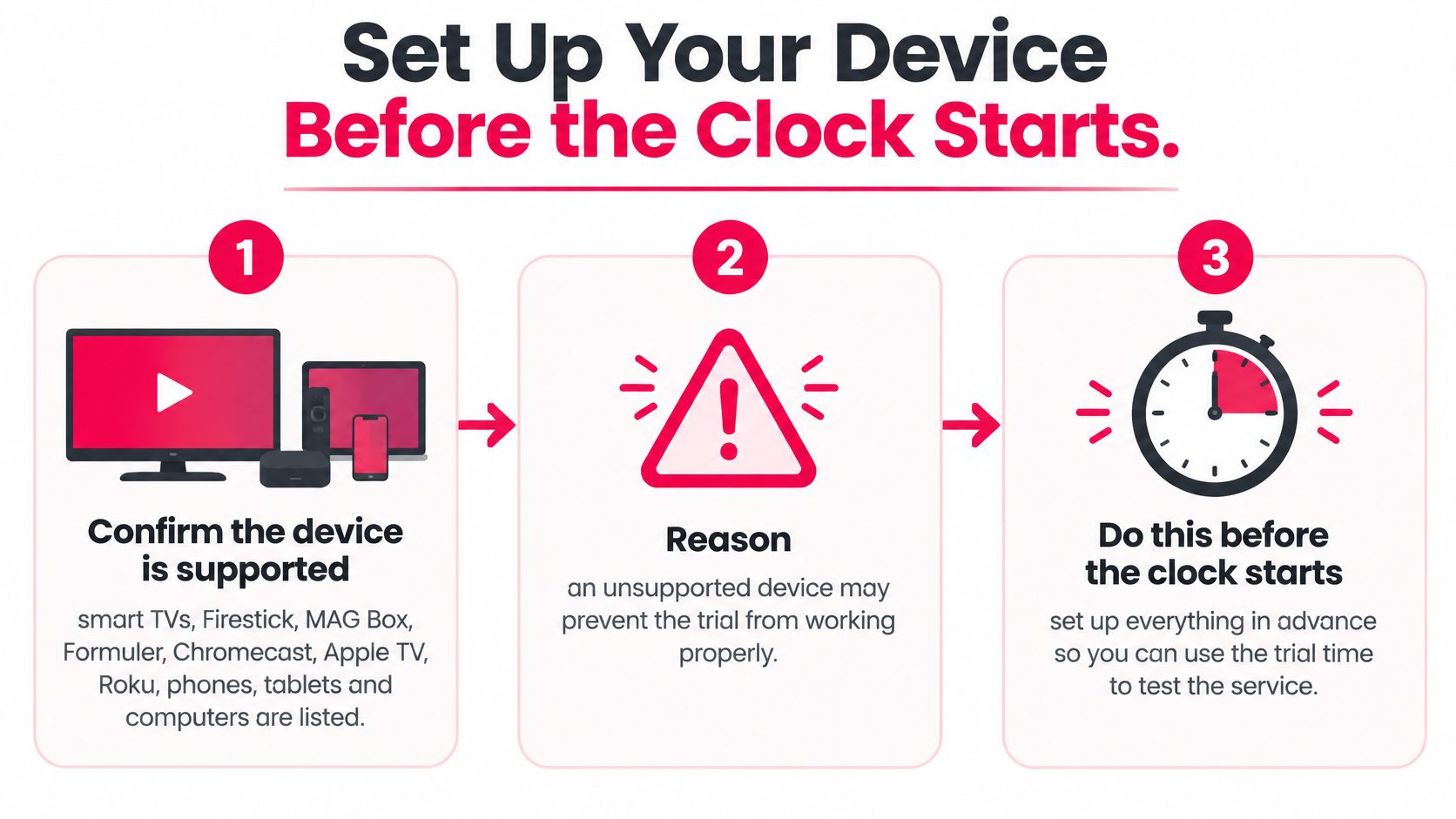
Do the setup before the 24 hours begin. An unsupported box, a mistyped username, or a weak extender can burn the evening you meant to spend on live TV.
ROVE IPTV subscription services are accessible immediately upon purchase, and step-by-step setup instructions come with every subscription, with 24/7 customer support behind them. Use that guide rather than a random app page.
- Confirm the device is supported. Smart TVs, Firestick, MAG Box, Formuler, Chromecast, Apple TV, Roku, phones, tablets, and computers are listed. An unsupported device wastes the trial, because you spend the window hunting for a player instead of judging channels.
- Connect the device to the network you will use most. Use Ethernet if the device has a port. A wired test separates a provider problem from a Wi-Fi problem. The common slip is testing on a weak Wi-Fi extender in another room, then blaming the stream.
- Install the player named in the setup guide. The service supports standard IPTV players, and the guide says which one fits each device. The common slip is installing an app from an unofficial source. Our IPTV installation guide walks through the official path.
- Enter the login from the trial signup. Paste the server details, username, and password rather than retyping them. A single wrong character produces repeated login failures that look like a dead service.
- Load one live channel, the programme guide, and one on-demand title. Stop there. If those three open, the basics work and you can move to a proper test. If they do not, fix activation before you time channel changes.
- Note when the trial started and when it ends. Twenty-four hours goes quickly once you add a live game and a second screen.
If activation fails, contact the support team during the trial. Technical issues in that window are handled through support, and that reply is part of the test.
Say you are weighing a longer plan such as the 12 Months IPTV Subscription Canada – 2 Devices option, which is described as a year of 4K and 8K streaming on 2 devices. Still run the trial on the two screens you would use, not on a phone you will put away.
The short video below shows a typical player setup. Follow the written steps for your own device, because menus differ between a Firestick and a smart TV.
Test Live Channels, Guide and On-Demand Titles
Score each item pass or fail. A wrong guide listing is not a small cosmetic issue. It is how you miss a programme you stayed in to watch.
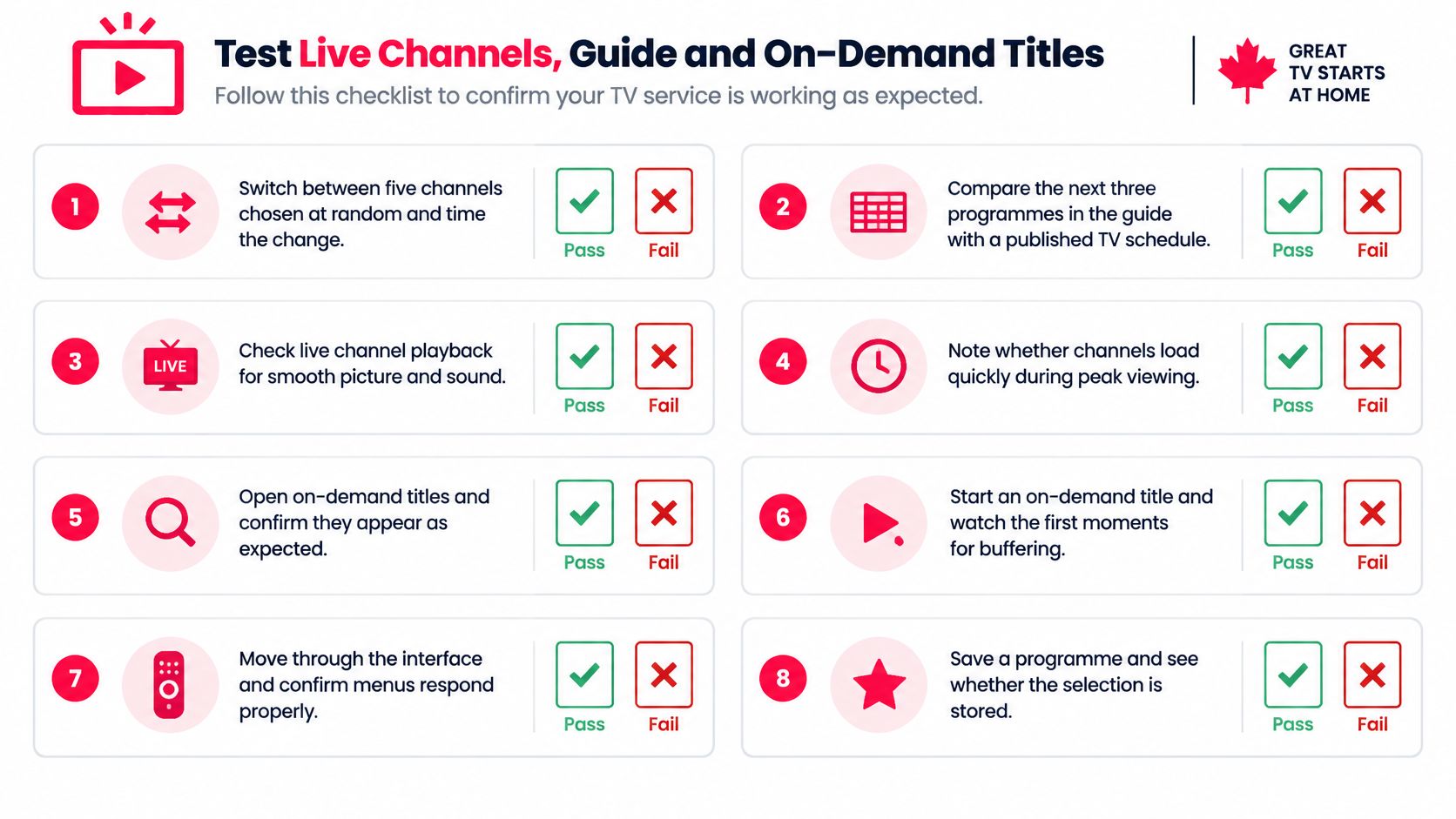
- Switch between five channels chosen at random and time the change. Slow changes matter more than a pretty home screen, because that is what evening viewing feels like.
- Compare the next three programmes in the guide with a published TV listing. If the guide is an hour off, or blank, you cannot trust reminders or catch-up later.
- Check Canadian and U.S. channels. In Quebec, open French-language channels and confirm the guide lists French titles. In other provinces, open the local news and regional sports you already rely on.
- Browse categories such as sports, news, kids, and international. A huge list that hides the channels you came for is a fail for your household, even if other categories look busy.
- Search on-demand by country, genre, release year, and popularity. If search only works for big U.S. titles, say so in your notes.
- Play one movie and one series episode through, then pause and resume. A title that dies at the 40-minute mark will not improve after you pay.
- Watch for resolution changes under load. Adaptive quality can drop the picture when the connection tightens. Note it. Do not assume the stream "fixed itself."
- Check whether backup feeds are listed for channels such as TSN or Sportsnet. A backup that is only a label, and will not play, does not count.
Raise any failure with support in the first six hours. That leaves time for a reply while you can still retest. A pass on all eight means the catalogue and the guide match what you expected to watch. It still does not settle data use or a packed sports night.
Measure Bandwidth and Data Use on Your Connection
Data is the limit most trials never mention. CRTC measurements put sampled Canadian television services at roughly 0.89 to 2.20 GB per hour, while 4K can reach about 5 GB per hour.
| Viewing scenario | Estimated data use | How to use it |
|---|---|---|
| One HD stream for 1 hour | 0.89 to 2.20 GB | Baseline for a single test session |
| 24 hours of continuous HD | 21 to 53 GB | Compare against your monthly data allowance |
| One 4K stream for 1 hour | About 5 GB | Only needed if you plan to test 4K |
| Four 1-hour HD streams at 2.20 GB each | About 8.8 GB in one hour | Test concurrent use before a household commits |
| 24 hours of continuous 4K | About 120 GB | Shows why 4K needs a larger allowance |
A 24-hour trial watched continuously in HD could use about 21 to 53 GB, before menus, previews, advertisements, retransmissions, or other household traffic. Nobody watches for 24 hours straight. The figure is a ceiling you compare with the allowance on your plan, not a prediction of a normal day.
One household hour
Picture four people each watching a different HD stream for an hour, at the high end of that range, 2.20 GB each. Together that is about 8.8 GB in one hour. A Saturday with sports in the living room and three other screens adds up faster than a single speed-test result suggests.
Adaptive bitrate delivery switches to a lower-quality picture when throughput falls. Playback keeps going, which feels like success, but the drop can hide congestion. If the image softens every time someone else joins a video call, write that down.
Acceptance test
Run the trial during the busiest period, on the connection you will really use. Check the monthly allowance against the table, and compare playback with adaptive quality left on, the way you would leave it after you subscribe.
If the line is wireless, a stable router matters as much as the advertised speed. Comredix's best wireless router picks are a useful place to see what current hardware is built to handle when several streams share one access point. If your ISP slows traffic in the evening, read how IPTV and ISP throttling shows up before you blame the player.
If the projected use would exceed your allowance, you need a larger data limit or fewer concurrent streams before you subscribe.
Stress-Test Live Sports Before You Pay
A trial that opens the sports category has not proved the stream will hold during a busy game. Channel counts and a successful login show access. They do not show continuity when many households tune in at once.
Sports viewing in Canada is still tied to traditional television. About 40% of Canadians reported watching sports on traditional TV in the past month in 2025, while fewer than 10% reported using online sports services, according to CRTC reporting. Expectations are high, and a short test only helps if you aim it at a real broadcast.
How to run the stress test
Test at the evening peak with a live NHL, CFL, NFL, or MMA broadcast, not a highlight package. Stay on the feed through a period or a quarter. Compare wired Ethernet and Wi-Fi on the same channel, and open several Canadian and U.S. feeds, including a regional one if that is what you would pay for.
Measure delay against a legal television or radio broadcast of the same moment. Network latency and broadcast lag are different things. The figures below describe delay on the connection, not how many seconds the stream sits behind the cable picture. You only learn that lag by watching the same play on both.
| Connection type | Typical peak-hour latency | What to test |
|---|---|---|
| Fibre | About 4 ms | Compare channel-switch time with wired Ethernet |
| DSL | About 12 ms | Test a live game over Wi-Fi during the evening peak |
| Cable or HFC | About 14 ms | Run two or more streams at once |
| Video streaming guideline | Around 35 to 42 ms or lower | Use as the upper limit for acceptable delay |
CRTC measurements put peak-hour average latency at about 4 ms on fibre, 12 ms on DSL, and 14 ms on cable or HFC, and describe latency around 35 to 42 ms or lower as generally desirable for video. A connection can pass a speed test and still buffer if packet loss, Wi-Fi interference, or congestion opens gaps.
If one stream is steady and a second stream causes drops, the bottleneck is often household Wi-Fi capacity or router airtime, not the IPTV server. Confirm whether a backup stream for that game plays, rather than sitting as a dead entry in the list.
A pass looks like a steady picture through channel changes and no long rebuffering during key plays. A fail is a freeze at a faceoff, a backup feed that will not start, or a delay so long that a group chat spoils the score.
Decide Whether to Subscribe After Your Trial
Subscribe only if the channel checks, the data check, and the live sports check passed on the connection your household will use. A trial answers whether the service fits your week. It does not, on its own, tell you a 12-month plan is the right buy.
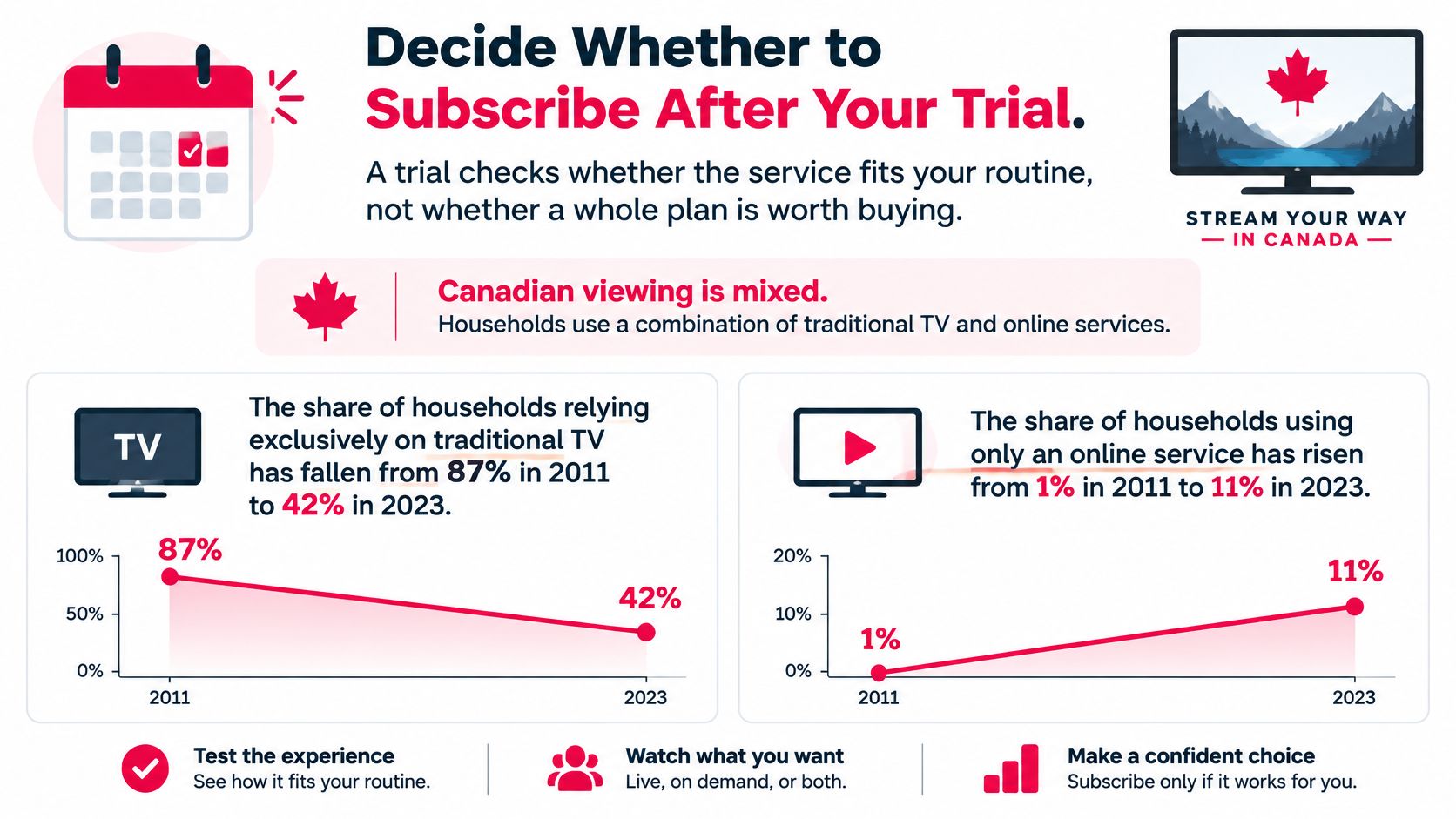
Canadian viewing is mixed, which is why a short test is useful. The CRTC reported that households relying exclusively on streaming rose from 23% in 2023 to 29% in 2024. In that same 2024 period, 76% of Canadians subscribed to at least one subscription video-on-demand service, while 62% still subscribed to traditional television. Many homes use both. A no-contract trial lets you set live channels, sports, and on-demand titles against that routine before you drop a conventional package or add another app.
Pick a period and a screen count
Rove IPTV lists a free trial on iptvrove.ca, and paid terms run 1, 3, 6, or 12 months, with 1 to 5 simultaneous connections. Match the screen count to people who watch at the same time, not to every device in the house.
- One month suits a household that passed the tests but wants a full week of real evenings before a longer term.
- Three or six months suit viewers who already know the channels and the connection behaved.
- Twelve months suits a home that passed sports, guide, and data checks and does not want to renew every few weeks.
- Screen count should equal concurrent watching. Two adults on different shows need two connections. A single TV does not need five.
Check CAD prices on the plan page when you buy. Treat catalogue totals and support descriptions on the site as the provider's own statements, and weigh them against what you saw in the trial. Our support team is Canadian-based, which helps when a question is about a local channel or a time zone, but a polite reply does not replace a passed sports test.
Run the checks in the order in this guide, inside the 24 hours, then compare plans on the official ROVE IPTV website at iptvrove.ca. If a live game failed on both Ethernet and Wi-Fi, or the data maths blows past your allowance, walking away is the result the trial was for.
ROVE IPTV offers Canadian viewers a 24-hour HD trial with no card, plus live channels, sports, and on-demand viewing on plans you choose by length and by how many screens play at once. Use the checks above so the trial shows what your connection and your channels do, then compare plans only if those checks passed. Visit ROVE IPTV to review the free trial and the current subscription options.

No Responses